Few people enjoy complex compliance – and GDPR (General Data Protection Regulation compliance can be both complex and documentation-heavy. A simple inquiry can generate a lot of work, for example, a data subject simply exercising their rights.
One way to streamline GDPR compliance is to make your ROPAs (records of processing activities) a focal point. Another is to look at your ROPAs together with data flow maps and DPIAs (data protection impact assessments).
We asked Andy Snow, a DPO (data protection officer) and data privacy trainer, to explain how to simplify and streamline GDPR compliance, using ROPAs as a starting point and moving on to data flow mapping and DPIAs.
In this interview
- Records of processing activities
- Data flow mapping
- Data protection impact assessment
- Bringing ROPAs, data flow maps and DPIAs together
- How to automate GDPR compliance
Records of processing activities
Previously, we discussed ROPAs. One practical tip you gave was to first list all processing activities before adding lots of data points. Another tip was to consider your ROPA a ‘one-stop shop’ – having all your information in one place. Could you elaborate?
ROPAs are a single place for you to understand your processing activities. And not just you – other stakeholders, too.
Suppose that the ICO [Information Commissioner’s Office] audits you. The first thing the regulator will likely ask for are your Article 30 ROPAs. If the ICO then wants to know, say, what lawful basis you’re relying on, they should be able to see it right there, in that ROPA.
Your ROPA should already have a column for lawful basis. Plus, if that lawful basis is legitimate interests, you could then add columns for:
- A brief outline of that legitimate interest; and
- A hyperlink to your LIA [legitimate interests assessment], proving the validity of that legitimate interest.
On the other hand, if your lawful basis is consent, you could also have a column that hyperlinks to evidence of that consent:
- When and how did the data subject give their consent?
- What information did you give them at the time?
- What withdrawal mechanism do you use?
- And so on.
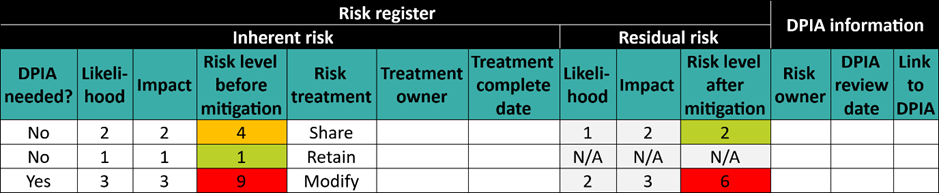
The ROPA is a high-level summary that should provide an immediate overview of:
- All your processing activities; and
- All the risks associated with them.
What sort of risks are you referring to here? And how can a ROPA give an overview of them?
The risks the GDPR always focuses on – risks to the rights and freedoms of data subjects.
As to how a ROPA provides an overview – you should have columns that indicate:
- How you’re processing and securing the personal data, using appropriate technical and organisational measures;
- What Article 6 lawful basis you’re relying on and, for special category data, Article 9 exemption;
- How you’re meeting the Article 5 data protection principles;
- What data subject rights are applicable;
- Whether international transfers are taking place, what mechanism you’re relying on to legally transfer personal data to a third country, and how you’re securing those transfers; and
- The level of risk of the processing activity, and if the risk is high, that you’ve performed a DPIA, with a link to that assessment.
The GDPR doesn’t require you to include all this in your ROPA, but this list does reflect the Regulation’s requirements, and it provides a convenient means of showing that you’re complying with them.
Collecting this data in your ROPA also gives a simple, clear overview of these data points, which in turn gives you a much clearer picture of your risks.
Data flow mapping
Let’s dig into what you said about “how you’re processing and securing the personal data”. What would that look like in a ROPA?
You’d have a group of columns in your ROPA that look something like this:
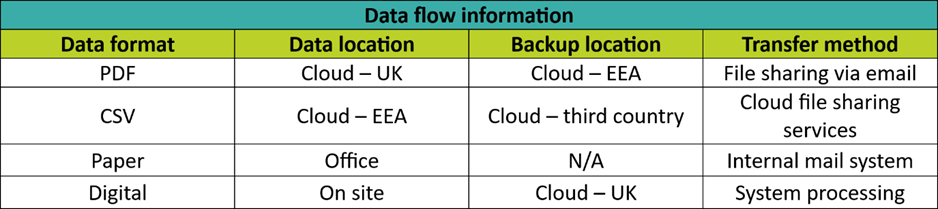
You can also add columns for implemented security measures, including information on encryption. For instance, you might have a drop-down menu with items like:
- Pseudonymisation
- Anonymisation
- Encryption
- Plaintext
You could also add details on the specific encryption protocol, particularly if your organisation uses more than one.
And you then feed this information into a data flow map?
Correct, but a data flow map also takes things further. It visualises the data flows, so you can easily see:
- Which departments are using what data; and
- The risks your data might be subject to.
For example, if your data flow map shows you’re storing a lot of personal data in Cloud-based databases, have you implemented appropriate access control?
The nature of the Cloud is that you can access it from anywhere with an Internet connection, so restricting access is vital, particularly if staff work remotely. If your employees are also based internationally, ensure you’re meeting local laws as well as the UK GDPR requirements.
Another thing to pay attention to is configurations – you really don’t want to inadvertently make your database publicly available, so did you configure it properly?
So, your data flow maps help organisations secure their personal data?
Yes. Because data flow maps show you where you’re storing, processing and transmitting personal data, they give a clear idea of where your security risks are. And
They also clearly show who’s using the data, and that tells you who to talk to in order to better understand and address those risks. This mapping exercise will highlight data you might be collecting but not using, in which case you should destroy it to:
- Meet your GDPR requirements [e.g. the data minimisation principle];
- Reduce the risks [the impact of a data breach]; and
- Save you money [storage costs].